


Gratitude: Self-Care Journal
4.98.88K Reviews
App Specs
- Version
- 7.2.3
- Updated On
- License
- Free
- Downloads
- 5,000,000+
- Developer
- Hapjoy Technologies
- Categories
- Lifestyle
- Platform
- Android, iOS
Screenshots



 Analysis by AppCompare
Using a journal on a shared household device calls for a little more thought than picking a quiet moment to write. A gratitude entry can include personal feelings, names, or details about a difficult day, so I’d treat it as private writing even when the device itself is shared. Gratitude: Self-Care Journal makes most sense when each person has a clear turn and understands that an entry is not automatically a message for the whole household.
Choose a routine that protects personal space
Before anyone else uses the device, agree on a simple boundary: one person writes at a time, and nobody browses another person’s entries without permission. That isn’t a special family setting I’d assume the app provides; it’s just a sensible habit for any journal used around other people. If a phone or tablet is passed around freely, I’d avoid leaving an open entry on screen and would close the app when finished.
For a household, a shared device can be convenient for establishing a routine, but it can also blur who is speaking. A short entry should begin with enough context for its writer to recognize it later, especially if several people take turns. If privacy is a priority or the device is routinely unlocked for everyone, a personal device or a paper journal may be a better fit.
Make the practice easy to coordinate
A low-pressure approach works better than trying to make gratitude journaling a household assignment. Each person can choose a time that already exists in their day, such as after breakfast or before putting the device away at night. Reminders can help an individual remember, but I wouldn’t use them to police whether someone else has written. The point is to make reflection available, not to turn it into another chore.
One practical option is to keep entries personal and share only a thought the writer actively chooses to read aloud. That preserves the useful distinction between journaling and conversation: the app can help someone notice what went well, while a family discussion can happen on everyone’s terms. If the goal is to coordinate schedules, chores, or household notes, a shared calendar or notes app is a more suitable tool.
Age, trust, and expectations
The app is rated for Everyone, but an age rating is not a substitute for talking with a child about what a journal is and who may see it. I’d explain that writing is optional, that a gratitude prompt doesn’t require a cheerful answer, and that nobody should feel pressured to share private thoughts. For younger users, an adult can introduce the idea with simple examples while letting the child decide what they want to record.
I’d also be clear about account boundaries. The app’s setup includes signing up, so a household should decide whose account is being used rather than treating one person’s login as a common family account. If several people want genuinely separate journals, separate accounts or separate devices are a clearer arrangement than taking turns inside one person’s account.
Worth Reading Before You Choose

EA SPORTS FC Mobile 26 Is a Bigger Football Game, but It Takes Time

Flipboard Shows What News Apps Must Do Beyond the Feed

Switching to Android Auto Means Rethinking Your Driving Routine

Google Calendar Makes a Crowded Week Easier to Manage

Ludo King Makes the Most of the Minutes Between Plans

Baby Panda World Brings Quick Play to Modern Phones, but Its Game Library Feels Busy
Who will get the most from it?
I think it suits someone who wants a gentle structure for noticing small positives but doesn’t want to build a journaling system from scratch. It may also work for a household member who likes prompts and visual touches, then prefers to keep the actual writing private. Someone who already writes freely in a notebook may find the app’s extra structure unnecessary, while a person looking for therapy, crisis support, or a way to manage shared household tasks should choose a different kind of resource.
Its Lifestyle category is a good match for this reflective use: the value is in fitting a small pause into ordinary life, not in tracking productivity or coordinating other people. A realistic routine might be taking a few minutes after a stressful commute to note one thing that helped, then adding a photo if it makes the memory easier to revisit. That’s more achievable than demanding a long entry every night, and it gives the journal a specific role rather than making it another app to maintain.
What the rating and price mean in practice
Hapjoy Technologies makes the app, which is free to download and has a 4.9 average from around 161,000 ratings. More than 5 million installs suggest that it has reached a broad audience, though popularity alone won’t tell you whether its approach suits your habits. It is rated Everyone, and the current version is 7.0.5; the app first appeared on March 29, 2018. Those details make it easy to place, but I’d still judge it by whether the prompts and routine feel comfortable in daily use.
There are in-app purchases, with items ranging from $3.99 to $59.99. I’d start with the free experience and decide whether the journaling habit itself is useful before spending anything. If you only want a blank place to write, a basic notes app or paper notebook may be enough; if you value prompts, visual customization, and related reflection tools, the extras may be more relevant. The main trade-off is choosing a guided experience over the complete flexibility of a blank page.
First Impressions Count
When I first opened Gratitude: Self-Care Journal, I was immediately struck by its calming design. The interface is super user-friendly, and the soft pastel colors are easy on the eyes. It feels like a warm hug every time you open it. The app's design is all about simplicity and effectiveness, making it straightforward to navigate even if you're new to journaling apps.
Features That Stand Out
What I love about this app is how it seamlessly integrates different self-care features. Here are some highlights:
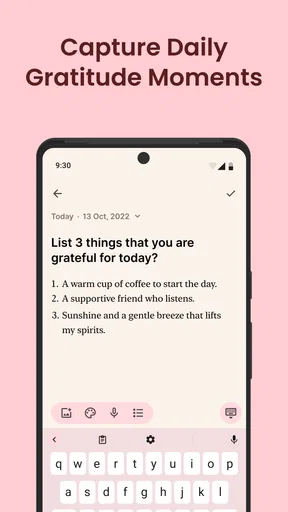
- Daily Gratitude Prompts: Every day, you'll get a gentle nudge to reflect on the positive things in your life. It's amazing how taking a few minutes to jot down what you're grateful for can shift your mindset.
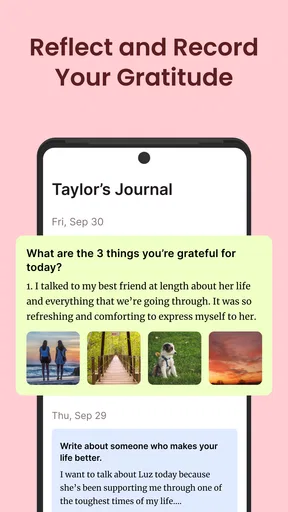
- Customizable Journal Entries: Whether you're having a great day or a not-so-great one, you can capture your thoughts with ease. You can add photos and use different fonts to personalize your entries.
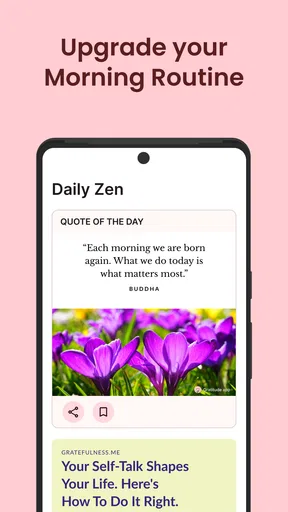
- Inspirational Quotes: Sometimes, all you need is a little inspiration. The app provides daily quotes to keep you motivated and uplifted.
Why Gratitude Matters
Practicing gratitude isn't just a trendy buzzword; it's a powerful tool for mental well-being. Studies have shown that focusing on what we're thankful for can help reduce stress and improve overall happiness. With Gratitude: Self-Care Journal, making this practice a daily habit is easier than ever.
Setting It Up
Getting started with the app is a breeze. After a quick sign-up process, you're ready to go. You can set reminders to ensure you don't forget to take a few moments for yourself each day. Trust me, these little reminders can make a big difference.
Journaling on the Go
One of the coolest features is that you can journal anytime, anywhere. Whether you're sipping coffee at a café or chilling at the park, your gratitude journal is just a tap away. It's like having a portable sanctuary that fits right in your pocket.
For me, the useful trick is to keep the entry small enough that I’ll actually return tomorrow. I might write one specific detail rather than a broad claim that the day was good: a helpful message, a quiet lunch, or finishing something I had been putting off. If I’m using a photo, I’d choose one that adds context rather than treating every entry as a scrapbook page. That keeps the visual option meaningful and stops the habit from becoming a hunt for the perfect image.
The app’s prompts and quotes can be a helpful starting point, but they won’t fit every mood. On a genuinely rough day, I wouldn’t force myself to turn a difficult experience into a positive lesson. I’d use the prompt to notice something neutral or simply skip writing until I’m ready. A journal should support honest reflection, not make someone feel they’re failing because they can’t find a bright side on demand.
"Gratitude turns what we have into enough."
This quote really sums up the essence of the app. It's all about appreciating the little things, and in doing so, we find contentment.
That idea is most useful when it stays grounded. Gratitude doesn’t erase a problem or mean that a person should accept a situation they want to change. I see the practice as a way to make room for something worthwhile alongside the hard parts, rather than a replacement for taking action or asking for help.
Community Vibes
Feeling connected to others is an important part of self-care. The app offers a community feature where users can share their gratitude entries and get inspired by others. It's a lovely way to see the world through different perspectives and realize we're all in this together.
Sharing is the part I’d approach most deliberately, especially if the journal is used in a family setting. I’d treat community participation as separate from household coordination and only share something that feels comfortable outside the private journal. Before posting, it’s worth checking whether an entry includes another person’s name or a detail they might not want shared. If someone wants a fully private, offline-feeling routine, keeping to personal notes—or choosing paper—may feel more reassuring than using a community feature.
The Verdict
So, what's the final take? If you ask me, Gratitude: Self-Care Journal is a gem of an app. It's not just about writing down a few lines every day; it's about cultivating a mindset that celebrates the good in life. As someone who's tried a fair share of journaling apps, this one stands out for its simplicity and genuine impact.
Whether you're a seasoned gratitude enthusiast or just starting out, this app is a fantastic tool to have on your self-care journey. So why not give it a try? You might just find that a little bit of gratitude goes a long way.
Pros
- Easy-to-use interface for daily entries.
- Customizable prompts for personal growth.
- Syncs with cloud for data backup.
- Offers guided gratitude exercises.
- Includes mood tracking features.
Cons
- Limited free features; premium required.
- No offline access for journal entries.
- Occasional sync issues reported.
- Lacks integration with other apps.
- Notifications can be overwhelming.
FAQs for Gratitude: Self-Care Journal
What features does the Gratitude: Self-Care Journal offer to its users?
Gratitude: Self-Care Journal provides a range of features designed to enhance your mental well-being. These include daily journaling prompts, mood tracking, positive affirmations, and a community space to share experiences. The app also offers guided meditations and personalized insights aimed at helping you cultivate a habit of gratitude and mindfulness.
Is the Gratitude: Self-Care Journal app suitable for both beginners and advanced users?
Yes, the Gratitude: Self-Care Journal is designed to be user-friendly for beginners while also offering advanced features for seasoned users. Beginners can start with simple journaling prompts and guided meditations, while advanced users can explore detailed insights and customize their gratitude practices according to their needs.
Does the Gratitude: Self-Care Journal require a subscription or is it free to use?
The app offers both free and premium features. While basic journaling and some prompts are available for free, a subscription unlocks additional features like advanced mood tracking, personalized insights, and access to exclusive content. Subscriptions are available on a monthly or annual basis, offering flexibility for different user needs.
How does the Gratitude: Self-Care Journal ensure user privacy and data security?
User privacy and data security are top priorities for the Gratitude: Self-Care Journal. The app employs encryption to protect your personal data and does not share your information with third parties without consent. Users can also opt to use the app offline, ensuring that their entries remain private and secure.
Can I customize my journaling experience in the Gratitude: Self-Care Journal?
Absolutely, the Gratitude: Self-Care Journal allows extensive customization to suit individual needs. Users can choose from various themes, set personalized reminders for journaling, and adjust the frequency of prompts. Additionally, you can create custom entries and organize them with tags to better reflect your personal gratitude journey.


